Showing posts with label Android. Show all posts

Android 4.3 for Galaxy S4: first update started in Germany


After so many rumors about the release of the release of Android 4.3 for Samsung Galaxy S4 , came the first official update on some devices for the non-branded version German.

These are the details:

PDA: I9505XXUEMJ5
CSC: I9505OXAEMJ5
ver : Android 4.3 Jelly Bean

Android 4.3 for Galaxy S4:

These are the new features:

  • Greater optimization
  • TouchWiz Launcher of Note 3
  • Web browser with full-screen mode
  • Samsung keypad layout with slightly redesigned
  • Samsung Wallet
  • Samsung Knox
  • Gallery Notes 3
  • Read mode (only for some applications)
Those who own a German import version of the device (with code DBT), can already download the update via OTA or via Samsung Kies.

The impatient instead who do not want to wait for the Italian release, they can manually download the firmware and install it with Odin. Below is the link to download the firmware:


We remind you that these new updates contain new security measures , so in case of modding (installation of ROM, root or recovery ), at least for now, you can not restore the warranty . In addition, the new version will no longer be possible to downgrade to previous version 4.2.2 Jelly Bean.


How to Install Android on LG E400 4 L3


Android 4 Ice Cream Sandwich version of the famous, is now joined by more than 50% of Android mobile devices.

How to Install Android on LG E400 4 L3

Many smartphone unfortunately (or fortunately, depending on the 'hardware) have not officially received the update, because some manufacturers were too busy to develop new software to the latest smartphone, others because they would not hold the phone system.
Today we present the guide to install Android 4 (experimental version, but really a good point, almost completely stable) on LG L3 E400.

This version of Android looks good, smooth, organized and aesthetically very supported (an update a week!), Plus improves the performance of the battery and introduces the much-renowned features of Android 4.

Step 1: Preparing files and settings

A) First, you need to download the ROM or the Android OS 4 from here . Insert it into the micro-phone's SD;

B) Download and inserted into the micro-SD well this file . (This is Google Applications: Play Store, Gmail etc.).

C) You get the Root permissions. If you do not have them, follow our video guide ;

D) Download and install from Play Store application "ROM Manager";

E) Please download and install the application from Play Store "Superuser";

Step 2: Install Android 4


How to Install Android on LG E400 4 L3

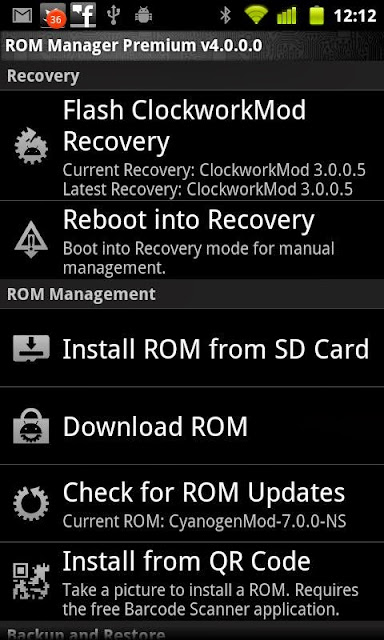
A) After obtaining permits Root, open ROM Manager, it will be more or less like this:

B) Click on " Install ClockworkMod Recovery "(you must be connected to the internet) and select your model. Date consentest

C) the operation is finished, click on " Reboot into Recovery ";

D) The phone will reboot and enter in recovery. Go to " Wipe data / factory reset "and dates it, or yes, same thing on" Wipe Cache Partition ";

E) Now go to " Install zip from sdcard "and select the. zip file containing the ROM Android 4 you have previously placed in your micro-SD card. Take it, or yes;

F) Go back to " Install zip from sdcard "and select the file you downloaded in step 1 letter B), take you, or yes;

G) Go to "Reboot now". The phone will reboot (5 minutes, it is the first turn! Once you "normalize") and will light up with Android 4 ICS!