Showing posts with label update. Show all posts

I9500XXUEMJ5 Android 4.3 for Galaxy S4 I9500 Jelly Bean Firmware


Galaxy S4 I9500 also received the I9500XXUEMJ5 Android 4.3 official firmware today. Samsung released this same firmware update for the LTE version of this phone yesterday and is doing the same for this device in phases. The manual installation files are now available for download so you can install easily using ODIN. For those having problems while installing this firmware from Samsung KIES, we already have a tutorial on how to install this software update on your phone manually: How to Update Galaxy S4 I9500 to XXUEMJ5 Android 4.3 Jelly Bean Firmware. This Android 4.3 build XXUEMJ5 firmware is an unbranded firmware, that you can install on your phone.


As you read further, we have tutorial links of how to install XXUEMJ5 Android 4.3 on Galaxy S4 I9500 using ODIN. You do not need to have a rooted phone or ClockworkMod recoverysince we are using ODIN which is way better than depending on a custom recovery (CWM recovery). Galaxy S4 XXUEMJ5 Android 4.3 Jelly Bean latest firmware update can be downloaded along with the complete tutorials from the links below. Continue reading below for more updates and tutorials on the latest I9500XXUEMJ5 firmware.

Android 4.3 XXUEMJ5 Firmware Features:

Here is a list of most of the changes and new features that have been included with this official Android 4.3 Jelly bean firmware update:
  • OpenGL 3.0 Support
  • GALAXY GEAR Support
  • TRIM Support (Makes the device much faster)
  • ANT+ Support
  • Samsung KNOX Implementation (KNOX bootloader and dedicated application)
  • Samsung Wallet comes pre-loaded
  • Improved RAM management
  • Improved Display colour reproduction (Display looks much sharper than before)
  • Improved TouchWiz Launcher (Much less launcher redraws and less lag)
  • New Samsung Keyboard
  • New Samsung Browser (Full screen by default, new tab interface and more)
  • New Reading Mode (Optimises display for reading, used by only a few specific applications)
  • New Camera firmware
  • Minor UI tweaks (Contacts app, Flashlight Widget, dialog boxes etc)
  • I9500XXUEMJ5 Firmware Details
Here are the firmware details of I9500XXUEMJ5 Android 4.3 for Samsung Galaxy S4 I9500:
  • PDA:I9500XXUEMJ5
  • CSC:I9500SEREMJ5
  • Version: 4.3
Download Android 4.3 XXUEMJ5 for Galaxy S4: Download Android 4.3 XXUEMJ5.

Source: Teamamdroid

Samsung Galaxy S4: New XXUEMJ3 Android 4.3 firmware


A new leaked firmware for the Samsung Galaxy S4 GT-I9505 testifies that the official rollout of Android 4.3 is imminent. By downloading and manual flash via ODIN software you can already get an almost 4.3 final impression of Android in the form in which it is to be rolled out to the Galaxy S4.

Samsung Galaxy S4

Purchaser of the Samsung Galaxy S4 (test) wondering for months when their device finally gets a bigger software update. Unlike the Google Edition of the device, which was promptly provided with Stock Android 4.3, the Samsung device has been the latest OS version, only in the form of a leaked firmware first seen and therefore dwells among most users continue to Android 4.2 .

At the weekend a new firmware is available from us for now Galaxy S4 model GT-I9505 spotted with 600 Snapdragon chip and provided for download to the public. This unofficial firmware has the build number I9505XXUEMJ3 and is, the insider of SamMobile, already reflect the state of development just before release. Even after several days of testing is the only at 8.10. compiled firmware stable, although there were minor changes here and there, by and large correspond to the firmware but the previous leak.

Build infos here:

  • Model: GT-I9505
  • Country: Open Asia
  • Version: Android 4.3
  • Changelist: 1840064
  • Build date: Tue, 8 Oct 2013 23:29:05 +0000
  • Product Code: OLB
  • PDA: I9505XXUEMJ3
  • CSC: I9505OLBEMJ2
  • MODEM: I9505XXUEMJ3
If you want to download the 1.5 GB hard firmware, they will at SamMobile and in the XDA-Developers forum . Is flashed, as always, on ODIN. Most Samsung based custom ROMs are meanwhile not yet updated - but in our experience it is likely to quickly give versions of Omega, WanamLite and Co. on the basis of XXUEMJ3 firmware.
Regular update in the next 14 days

SamMobile also reported that their insiders have revealed that the official rollout of Android 4.3 for the Galaxy S4 should not have to wait long in coming: in one to two weeks, it was ready. This would be consistent with all previous statements which have predicted the start of the rollout in October.

We advise the restrained anticipation, because the start of the rollout is not known for a long time that dorm unit is powered. Depending on country and provider branding the coveted firmware update may well be a little longer in coming. The surest way to the latest Android thus results in the Same Samsung continues to flash.


Android 4.3 for Galaxy S4: first update started in Germany


After so many rumors about the release of the release of Android 4.3 for Samsung Galaxy S4 , came the first official update on some devices for the non-branded version German.

These are the details:

PDA: I9505XXUEMJ5
CSC: I9505OXAEMJ5
ver : Android 4.3 Jelly Bean

Android 4.3 for Galaxy S4:

These are the new features:

  • Greater optimization
  • TouchWiz Launcher of Note 3
  • Web browser with full-screen mode
  • Samsung keypad layout with slightly redesigned
  • Samsung Wallet
  • Samsung Knox
  • Gallery Notes 3
  • Read mode (only for some applications)
Those who own a German import version of the device (with code DBT), can already download the update via OTA or via Samsung Kies.

The impatient instead who do not want to wait for the Italian release, they can manually download the firmware and install it with Odin. Below is the link to download the firmware:


We remind you that these new updates contain new security measures , so in case of modding (installation of ROM, root or recovery ), at least for now, you can not restore the warranty . In addition, the new version will no longer be possible to downgrade to previous version 4.2.2 Jelly Bean.


How to Install Android on LG E400 4 L3


Android 4 Ice Cream Sandwich version of the famous, is now joined by more than 50% of Android mobile devices.

How to Install Android on LG E400 4 L3

Many smartphone unfortunately (or fortunately, depending on the 'hardware) have not officially received the update, because some manufacturers were too busy to develop new software to the latest smartphone, others because they would not hold the phone system.
Today we present the guide to install Android 4 (experimental version, but really a good point, almost completely stable) on LG L3 E400.

This version of Android looks good, smooth, organized and aesthetically very supported (an update a week!), Plus improves the performance of the battery and introduces the much-renowned features of Android 4.

Step 1: Preparing files and settings

A) First, you need to download the ROM or the Android OS 4 from here . Insert it into the micro-phone's SD;

B) Download and inserted into the micro-SD well this file . (This is Google Applications: Play Store, Gmail etc.).

C) You get the Root permissions. If you do not have them, follow our video guide ;

D) Download and install from Play Store application "ROM Manager";

E) Please download and install the application from Play Store "Superuser";

Step 2: Install Android 4


How to Install Android on LG E400 4 L3

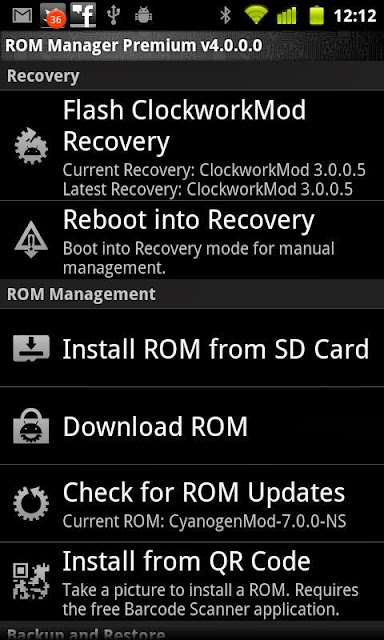
A) After obtaining permits Root, open ROM Manager, it will be more or less like this:

B) Click on " Install ClockworkMod Recovery "(you must be connected to the internet) and select your model. Date consentest

C) the operation is finished, click on " Reboot into Recovery ";

D) The phone will reboot and enter in recovery. Go to " Wipe data / factory reset "and dates it, or yes, same thing on" Wipe Cache Partition ";

E) Now go to " Install zip from sdcard "and select the. zip file containing the ROM Android 4 you have previously placed in your micro-SD card. Take it, or yes;

F) Go back to " Install zip from sdcard "and select the file you downloaded in step 1 letter B), take you, or yes;

G) Go to "Reboot now". The phone will reboot (5 minutes, it is the first turn! Once you "normalize") and will light up with Android 4 ICS!